Your Mac is already on all day. Miner Watcher turns it into a 24/7 monitoring station for every miner on your network: watching, alerting and recovering in the background, with no window open and no cloud account.
Menu-bar indicatorRuns in the backgroundNo accountData Not Collected
$1.99One-time purchase, no subscription
3 algorithmsSHA-256, Scrypt, Equihash
Fleet-widecontrol per device or per group
0 bytesof your data collected
Screenshots
See Miner Watcher in action
Tap any screenshot to enlarge.
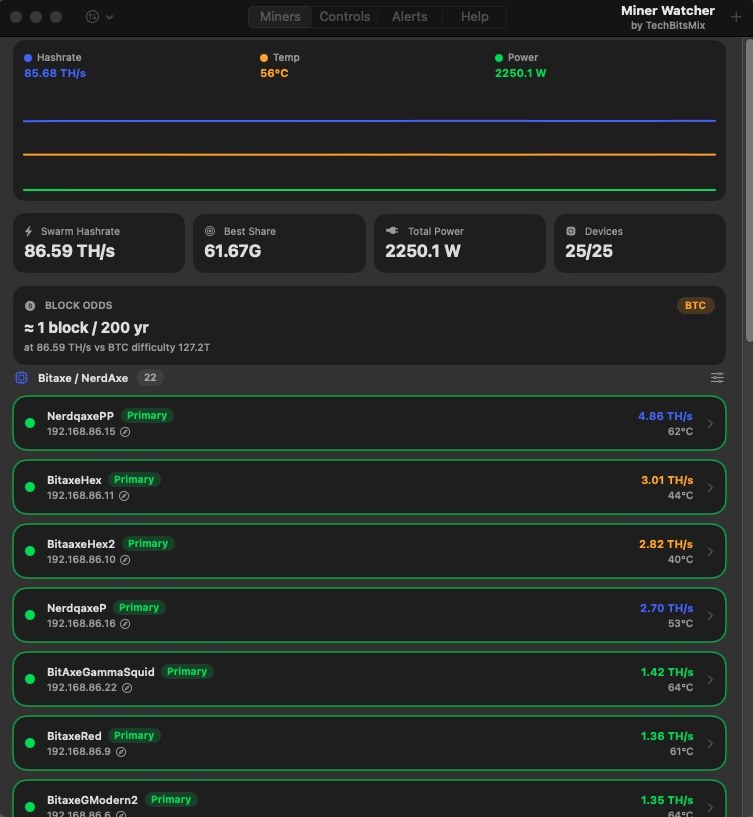
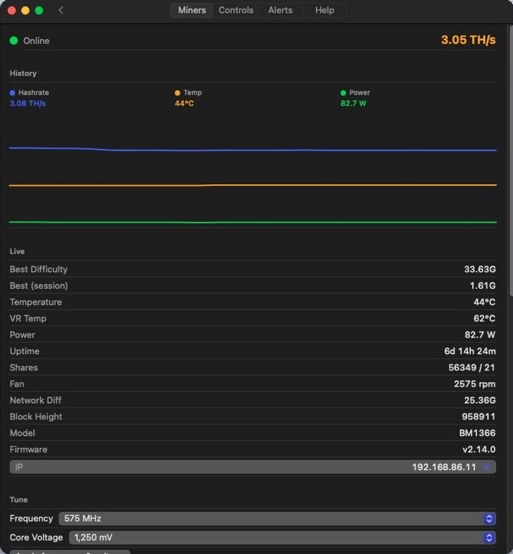
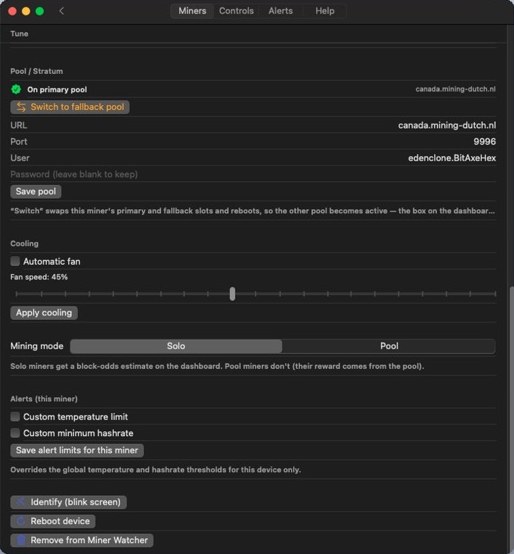
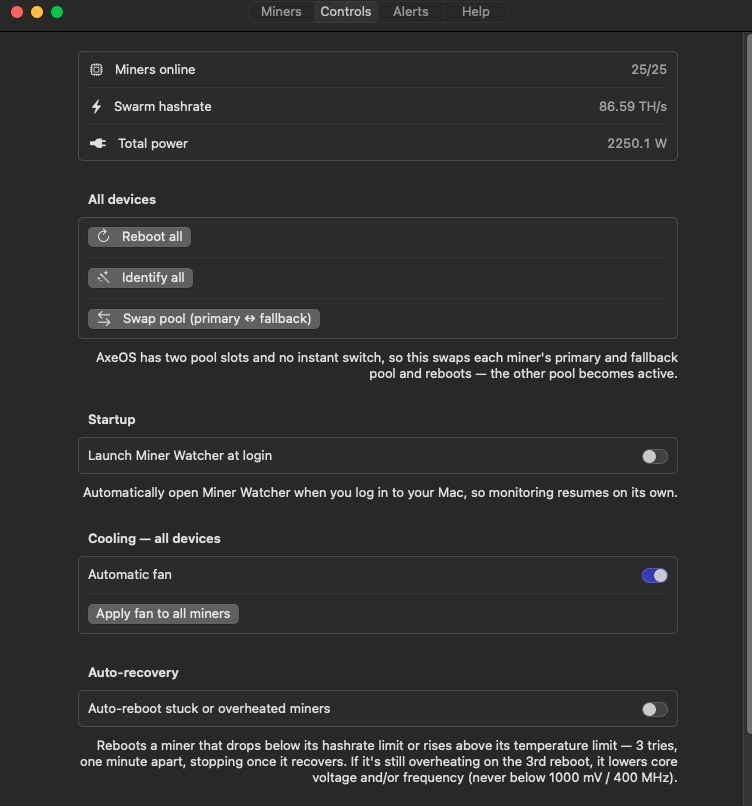
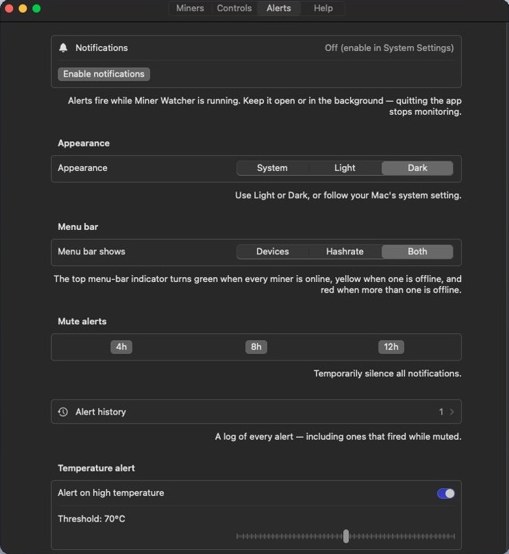
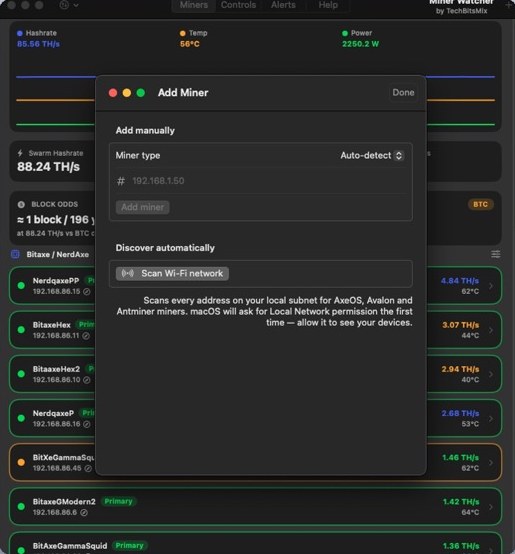
Fleet dashboard: swarm hashrate, power, best share, block odds and every miner at a glanceMiner detail: live stats, history chart, firmware info and frequency/voltage tuningPer-miner pool switching, cooling, Solo/Pool mode and custom alert limitsFleet controls: reboot, identify or swap pools on every device, plus launch at login and auto-recoveryAlerts, mute timers, alert history, appearance and the menu-bar status indicatorAdd a miner by IP or scan your Wi-Fi for AxeOS, Avalon and Antminer devices
How it works
Set it once, then forget about it
Miner Watcher is designed to run quietly in the background so problems get handled even when you're not looking.
Scan your network
Find every compatible miner on your LAN, or add any miner by IP address.
Organise into groups
Group miners by room, type or pool. Every control works per device or per group.
Let it run
Enable launch at login. Monitoring, alerts and auto-recovery continue in the background.
Features
Desktop-class control for a home fleet
Everything in the iPhone apps, plus the extra muscle a Mac that's always on makes possible.
Fleet dashboard
Live hashrate, temperature, power, best share and uptime, with per-algorithm units and totals.
Background alerts
Native macOS notifications for heat, low hashrate, offline miners, best shares and blocks found.
Auto-recovery
Per-miner scheduled reboots and low-hashrate reboots. A missed window fires late once instead of being skipped.
Reboot after N hours or at a set time
Reboot if hashrate stays under threshold 5+ min
Pool control
Switch a group between Primary and Fallback; the switch is forced on every miner and re-checked after 5 minutes.
Beta: automatic per-group rotation every 1–24 h
Tuning
Fan, performance/work mode, frequency and voltage on supported hardware, per device or fleet-wide.
Multi-coin block odds
BTC or BCH solo odds, plus Scrypt (LTC/DOGE) and Zcash odds when you run those miners, each switchable.
Bulk pool & wallet changes
Change the pool or payout wallet for one hardware type or the whole fleet in a single step.
Menu bar & launch at login
A menu-bar indicator shows fleet status at a glance; launch at login keeps monitoring running after restarts.
Brand-free labels
Rename every miner whatever you like; the app stays neutral.
Supported miners
The widest hardware support in the family
Miner Watcher supports everything BlockSeeker does. New device support usually lands here first.
Open-source solo minersAxeOS API
Bitaxe (all models)
NerdAxe & NerdQAxe
NMAxe
Compact home ASICsCGMiner API
Canaan Avalon Nano 3 & 3S
Goldshell Mini-DOGE (Scrypt)
Full-size ASICsSHA-256 · Scrypt · Equihash
Bitmain Antminer, stock firmware
Vnish, Braiins OS, LuxOS
Incl. L7 (Scrypt) & Z-series (Equihash)
Pool rotation is in Beta and works best on AxeOS devices; it's hidden for Avalon for now. Miner Watcher is independent and not affiliated with any hardware or firmware maker.
Safety · Security · Privacy
A control room that stays inside your house.
Miner Watcher connects only to devices on your local network, using their own APIs. Quit the app and it stops; nothing keeps running elsewhere.
All monitoring and control happen between your Mac and your miners.
0data types collected
0third-party SDKs
0accounts required
Local network onlyTalks directly to miners on your LAN. macOS asks for Local Network permission, and you stay in control of it.
No servers, no backendThere's no TechBitsMix cloud. Nothing to breach, nothing that can go offline.
No accountNo sign-up, no email, no password.
No trackingNo analytics, ads or third-party SDKs.
Sandboxed Mac appRuns inside Apple's app sandbox with only the permissions it needs.
Guard-railed automationAuto-reboots are opt-in per miner and pool rotation is clearly marked Beta.
Full details: Privacy Policy. App Store privacy label: “Data Not Collected.”
Roadmap
1.2 is live. 1.3 is the biggest update yet
Miner Watcher is where new features land first, then get ported to BlockSeeker and AxeSentry.
Shipped
Fleet monitoring, alerts & control1.0
Bulk pool & wallet changes1.2
Scheduled & low-hashrate reboots1.2
Per-algorithm units & alert thresholds1.2
In progress
Goldshell Mini-DOGE & NMAxe support1.3
Primary ⇄ Fallback group switch1.3
Multi-coin block odds1.3
Per-group pool rotation (Beta)1.3
Planned
Pool rotation: Beta → stableAfter 1.3 feedback
More device familiesFrom user requests
Exploring
Historical charts & exportLonger-term analytics
Port new features to iPhone appsBlockSeeker & AxeSentry parity
Roadmap items are plans, not promises; timing depends on App Store review and firmware changes by hardware makers. Have a request? Email TechBitsMix@gmail.com.
For investors & acquirers
The desktop half of a cross-platform toolkit
Serious home miners run their fleets from a computer. Miner Watcher gives TechBitsMix a desktop product sharing the same integration engine as the iPhone apps, so each new device is written once and shipped everywhere.
Make sure your Mac is on the same local network as your miners and allow Local Network access in macOS. Then use Scan, or add a miner by its IP address.
Does it keep working with the window closed?
Yes. Monitoring and alerts continue in the background while the app is running. Quitting the app stops monitoring. Enable launch at login from the Controls tab.
Which devices are supported?
Bitaxe, NerdAxe/NerdQAxe and NMAxe (AxeOS); Avalon Nano miners; Goldshell Mini-DOGE; and Antminer units on stock, Vnish, Braiins OS or LuxOS firmware.
What can I control?
Reboot, switch pools, set fan or performance/work mode, and tune frequency and voltage on supported hardware, per device or fleet-wide.
Does Miner Watcher collect my data?
No. It runs entirely on your local network with no account and no tracking. See the Privacy Policy.